Bindings Documentation
Documentation for Rust4PM v0.4.3. This covers all functionality exposed through the dynamic binding system.
You are viewing documentation for an older version (v0.4.3).
View latest version (v0.5.2)
Language Bindings
The code examples below may be outdated for this version.
Rust4PM provides bindings for multiple programming languages. Install the package for your language to get started.
Python
r4pm
pip install r4pm==0.4.3Two APIs are available for working with Rust4PM in Python:
Basic DataFrame API
Easy import/export of event data (XES, OCEL 2.0) as DataFrames. Use this API for quick data manipulation and analysis, or for integration with PM4Py.
import r4pm
# df is a polars DataFrame
# use df.to_pandas() for usage with PM4Py
df, attrs = r4pm.df.import_xes('log.xes')
r4pm.df.export_xes(df, 'output.xes.gz')
# For OCEL with PM4Py support:
ocel = r4pm.df.import_ocel_pm4py('ocel.xml')
Full Bindings API
Full access to all Rust4PM functions documented here. Large data (e.g., event logs) are stored in item registry for efficient handling.
import r4pm
# Import an event log into the item registry
log = r4pm.import_item('EventLog', 'log.xes')
# Export an item from the registry
r4pm.export_item(log, 'output.xes.gz')
# Use any binding function
res = r4pm.bindings.discover_dfg(event_log)
User Interface
numi.aarkue.eu
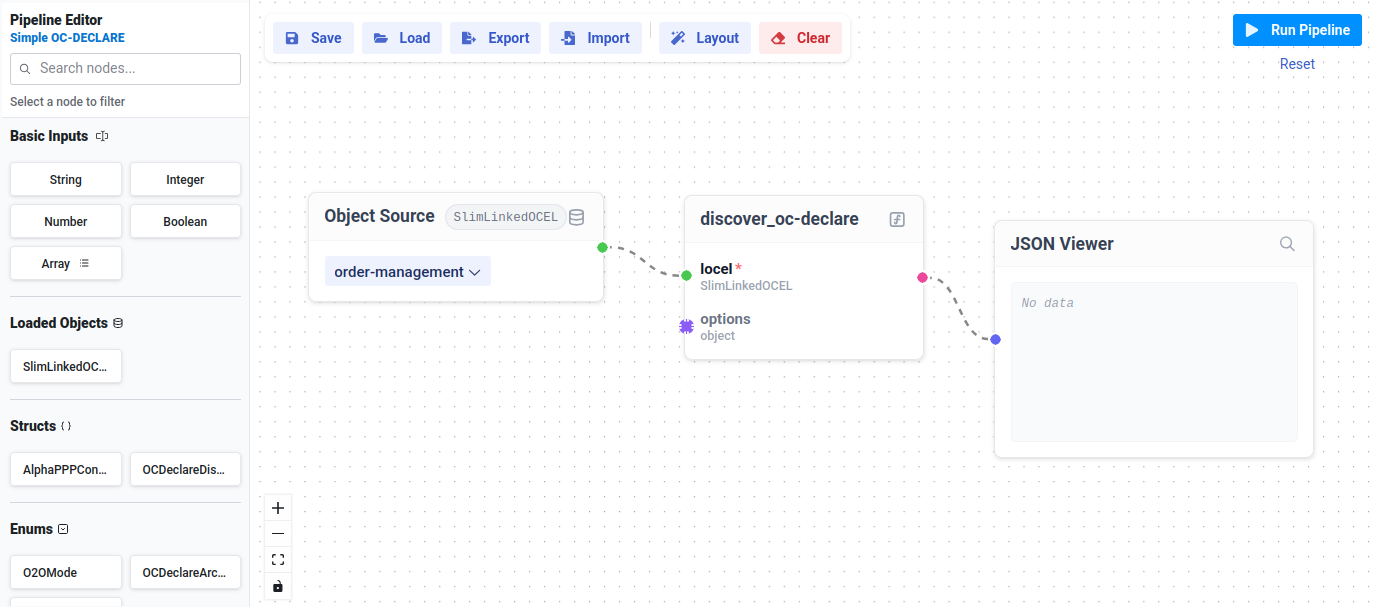
A Graphical User Interface (GUI) for the Rust4PM project. Run process mining functions directly from your browser without writing code. Includes a visual pipeline editor.
Command Line Interface
r4pm
cargo install r4pm@0.4.3The install command above builds the CLI from source and thus requires a Rust toolchain to be available. See also rust-lang.org/tools/install/.
Use the CLI to run process mining functions directly from your terminal.
r4pm discover_dfg --event_log log.xes dfg.jsonModules
Popular Functions
discover_dfg
process_mining::discovery::case_centric::dfg
discover_alpha+++
process_mining::discovery::case_centric::alphappp::full
discover_oc_declare
process_mining::discovery::object_centric::oc_declare
oc_declare_conformance
process_mining::conformance::object_centric::oc_declare
add_init_exit_events_to_ocel
process_mining::core::event_data::object_centric::utils::init_exit_events
flatten_ocel_on
process_mining::core::event_data::object_centric::utils::flatten